Two payment types in PayTask
In the PayTask service for tracking piecework wages, two payment methods for tasks are available:
- Payment per task completion — a fixed amount for each task execution
- Payment by execution time — payment is calculated based on the time spent on task execution
You can use either of these payment types depending on the nature of the work.
Payment per task completion
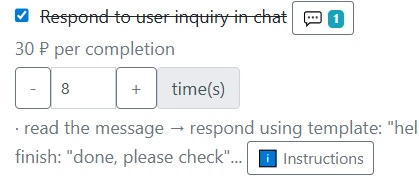
This payment type is suitable for tasks with a fixed workload. For each task execution, the worker receives a set amount, regardless of the execution time.
When to use
- Tasks with roughly equal workload
- Repeating operations with a fixed outcome
- When the number of completed tasks matters more than the time
Task examples
- Packaging one order — $50
- Processing one document — $30
- Delivering one address — $200
How to set up
- When creating or editing a task, enter the amount in the "Payment per completion" field
- Leave the "Payment per minute" field empty or set it to 0
- When marking a task as completed, payment will be automatically added
Important: For tasks with multiple completions (the "Multiple marking" option), payment is calculated for each completion separately.
Payment by execution time
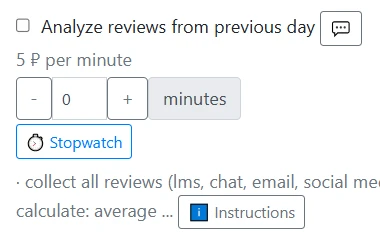
This payment type is used when the execution time of a task can vary. Payment is calculated using the formula: execution time (in minutes) × rate per minute × labor multiplier.
When to use
- Tasks with variable workload
- When execution time differs significantly
- For tasks that require an individual approach
Task examples
- Equipment repair — $100 per minute
- Client consultation — $50 per minute
- System setup — $80 per minute
How to set up
- When creating or editing a task, enter the rate in the "Payment per minute" field
- The "Payment per completion" field can also be set; in that case, this amount will be added additionally for task completion
- When marking a task, the worker or employer must specify the execution time in minutes
- The system will automatically calculate the payment: time × rate per minute
Important: Execution time is entered manually when marking a task. You can set approximate average execution times for planning convenience.
Calculating total salary
The PayTask system automatically calculates the total salary based on all completed tasks:
- Summing up payments for all tasks with per-task payment
- Summing up payments for all tasks with time-based payment
- Applying coefficients (multipliers) for weekend days if they are set
- Generating a salary report with detailed breakdown per each task
Recommendations
- For standardized operations, use payment per task — it motivates workers to complete tasks faster
- For tasks with variable complexity, use payment by time — it ensures fair wage payment
- Set realistic rates, considering average productivity and market conditions
- Regularly analyze salary reports to optimize the payment system
Proper configuration of task payment types is the foundation of efficient piecework wage accounting and employee motivation in the PayTask service.