Why You Need a Profile
A Paytask profile is the data hub for piece-rate payroll calculations, task tracking, and time tracking. Here, employers and workers can see contacts, currency settings, time zone, and payment details to accurately track work time and calculate pay.
- Transparency: contacts, full name, email, currency, and time zone are visible to those you work with.
- Connections: invitation buttons for employers or workers control access to payroll data.
- “About Me” content: a resume and links help speed up onboarding.
- Reports: task and payroll reports are available from the profile.
Viewing a Profile
Open users/profile.php or follow a profile link. At the top there is a ready-to-copy link: click Copy to send the profile to an employer or worker.
1. In the profile card header, invitation buttons are displayed:
- Invite to My Employers or Accept Invitation — when you want to be hired.
- Invite to My Workers or Accept Invitation — when you are hiring.
- You can cancel an invitation or remove an existing connection; in the demo account, removing an employer/worker is disabled.
2. Core information:
- Full name, date of birth with age calculation, email address.
- Time zone with calculated UTC offset.
- Currency for displaying piece-rate pay and calculations.
- Address and social network link, if provided.
- Payment details and phone number are visible only to the owner, an administrator, or connected employers/workers.
3. Statistics:
- Last visit, page views.
- Number of tasks and groups, completed tasks.
- Report buttons: worker payroll, employer payroll, employer tasks.
Privacy: if there is no worker/employer connection, the phone number and payment details are hidden. A connection can be established via an invitation.
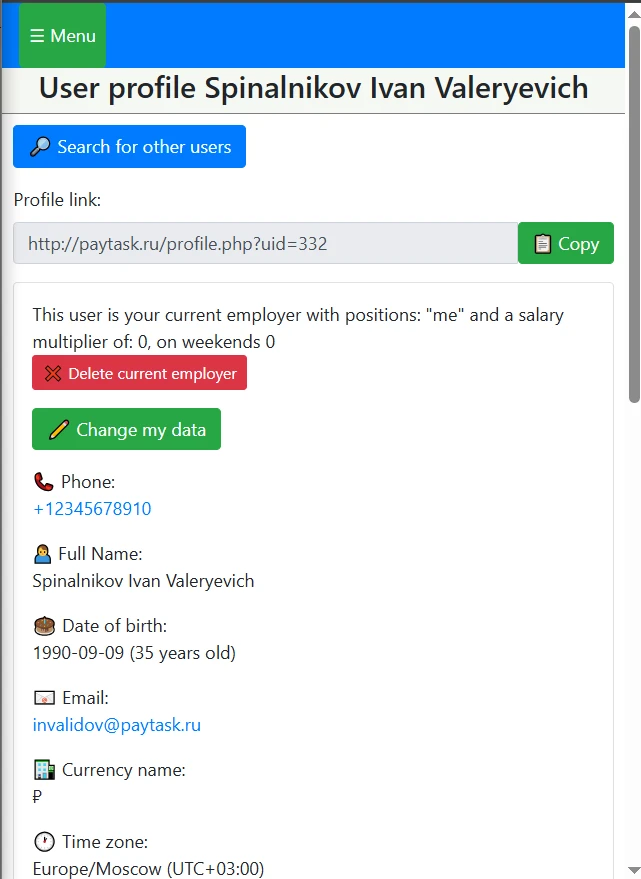
profile card
Editing Your Profile
Click ✏️ Edit My Details in your profile or open https://paytask.ru/users/profileedit.php. All changes are saved immediately and used in task tracking, the process manager, and piece-rate payroll calculations.
- Fill in the required fields: phone number, full name, date of birth, email, currency name, time zone.
- Optional fields: password (leave blank to keep unchanged), address, social network link, payment details, the “first day of the week — Sunday” flag, and the “About Me” section.
- Select your time zone from the list with a UTC hint; by default, the saved or local time zone is used.
- The “About Me” field is edited via Quill: it supports formatting and stores both text and HTML versions (observe size limits).
- Click Save Changes and return to your profile.
Important: demo accounts cannot save changes. The phone number must be unique; phone and email formats are validated. Password length is 4 to 15 characters. Currency name is up to 8 characters. Length limits apply to the address, links, payment details, and the “About Me” section.
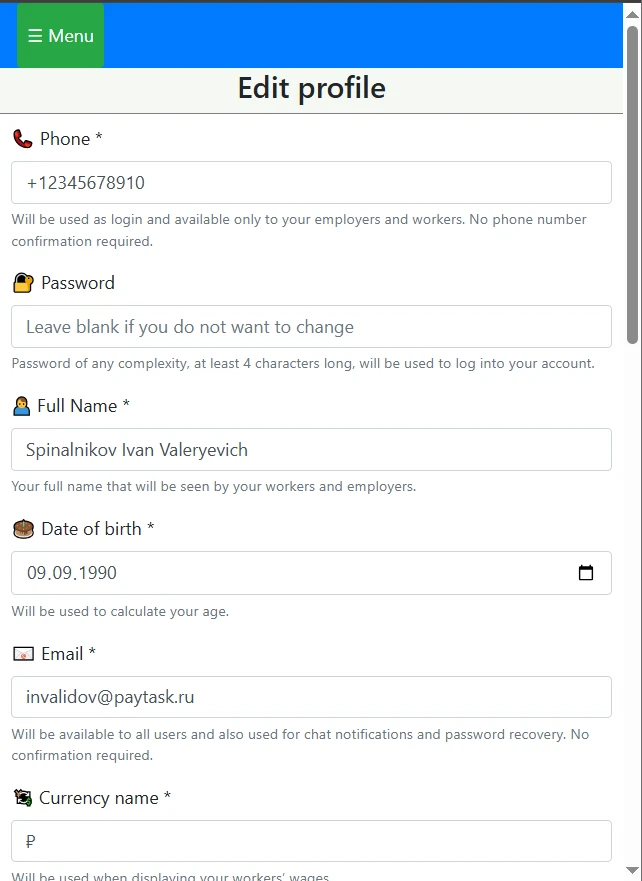
profile edit form with phone, full name, currency, and time zone fields
Tips for Working with Tasks and Payroll
- Set the correct time zone and first day of the week so task reports and payroll calculations align with your calendar.
- Specify the currency so all piece-rate payroll reports display in a familiar format.
- Add payment details — they are visible only to connected users and speed up payouts.
- Include a social network link and an “About Me” section so employers can trust the contractor faster.